Linux Kernel Drivers
Overview
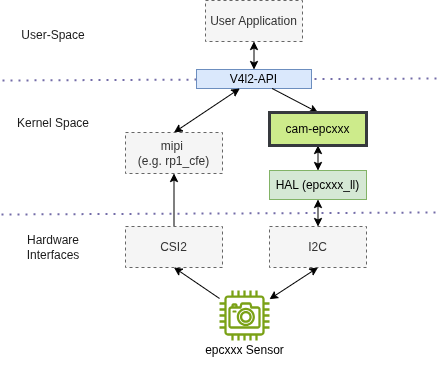
The ESPROS kernel drivers are implemented as V4L2 sub-device drivers (e.g. cam_epcxxx in the image below) and are primarily accessed through the Video4Linux2 (V4L2) framework.
This framework provides a standardized interface for image capture, streaming, and device control. Each driver integrates with the Linux media subsystem, uses the ESPROS HAL for low-level sensor access, and exposes a V4L2 sub-device for control together with a video node for frame streaming.
These sub-devices are intended to be paired with a V4L2 capture device, such as the rp1-cfe Raspberry Pi CSI driver, to form a complete video capture pipeline. This allows the ESPROS kernel drivers to be integrated on multiple platforms with minimal platform-specific effort while preserving access to the full sensor feature set. Have a look at the V4L2 Interface Overview for more details on the V4L2 interface and its usage with ESPROS kernel drivers.
In addition to the V4L2 interfaces, the drivers also exposes DebugFS interfaces for low-level register access and status inspection, as well as hwmon interfaces for monitoring sensor parameters such as temperature.
ESPROS Kernel Drivers
External Kernel Drivers
The following external drivers are required for proper operation of the ESPROS kernel drivers:
rp1-cfe: Raspberry Pi MIPI capture driver
clk-si5351a: clock generator
brdg-tc358746: parallel-to-MIPI bridge
DKMS Packages
The kernel drivers listed above are also available as DKMS packages for simplified installation and maintenance.
These packages include the kernel module source code, build scripts, and installation metadata required by DKMS. After installation, DKMS automatically rebuilds and reinstalls the appropriate kernel modules when the target kernel changes, reducing manual maintenance effort.
The dkms packages are bundled and shipped with the epc-drivers-dkms debian package. If you need access to the kernel module source code directly, please contact the ESPROS support team.
For more information about DKMS, see the Dynamic Kernel Module Support wiki.