Debian Packages
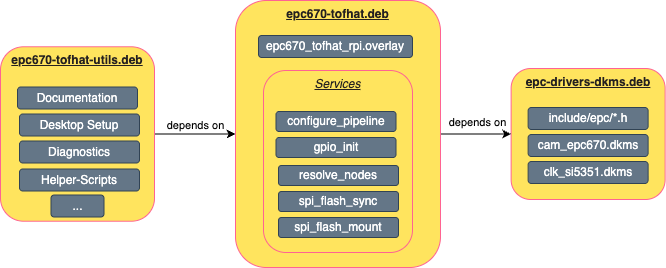
There are multiple debian packages for the ESPROS device drivers. They are split into hardware support packages and kernel drivers.
epc-drivers-dkms: Bundled DKMS packages for the ESPROS kernel drivers.
epc670-tofhat: Board support package for the epc670 ToF HAT+ module, including device tree overlays and multiple services for device initialization and configuration.
epc670-tofhat-utils: Additional helper tools and documentation for the epc670 ToF HAT+ systems. This includes diagnostic tools, desktop setup scripts and documentation.
Installation
To be able to install the ESPROS debian package, you first need to add the ESPROS package repository to your system.
Download and add ESPROS public key to your system:
Add ESPROS public keysudo wget http://apt.espros.com/espros-archive-keyring.gpg -P /usr/share/keyrings/
Add the ESPROS package repository to your system:
Add ESPROS package repositoryecho "Types: deb URIs: http://apt.espros.com Suites: trixie Components: main Signed-By: /usr/share/keyrings/espros-archive-keyring.gpg" | sudo tee /etc/apt/sources.list.d/espros.sources
Update your package list and install the desired ESPROS debian package:
Update package list and install packagesudo apt update sudo apt install epc-drivers-dkms sudo apt install epc670-tofhat
Packages
Detailed information about the individual packages can be found in the following sections.