TOFcam API
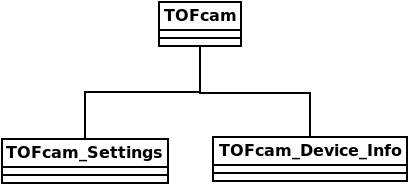
Every TOFcam device has its own class, which inherits from the base class TOFcam and implements the device-specific methods. All TOFcam subclasses implement a TOFcam_Settings and a TOFcam_Device_Info class, which are used to store the device settings and device information, respectively.
TOFcam670 API
Note
The native TOFcam670 API is merely a wrapper for the epc-tofcam-native python package. When developing native applications for the Raspberry Pi, consider using the epc-tofcam-native library directly.
TOFcam670
- class epc.tofCam670.tofCam670.TOFcam670(ip_addr=None, port=8000)
Creates a new TOFcam670 object.
If no ip address is specified, this will assume the epc670 camera is available locally on this system (native interface).
If you provide an ip address, this will attempt to connect remotly over the network (web interface).
The TOFcam670 object holds two attributes:
settings: allows to control the settings of the camera.
device: allows to get device information from the camera.
- get_amplitude_image()
Get amplitude image, with error codes removed (set to NaN)
- get_distance_image()
Get distance image in mm, with error codes removed (set to NaN)
- get_grayscale_image()
Get grayscale image
- get_point_cloud()
Get point cloud in meters, with error codes removed (set to NaN)
- get_raw_dcs_images()
Get raw DCS images
TOFcam670_Settings
- class epc.tofCam670.tofCam670.TOFcam670Settings(cam: TOFcam670)
Class used to change settings on the TOFcam670.
- get_roi()
Get the current region of interest (ROI) for the TOFcam670 device.
- set_acquisition_mode(mode: AcquisitionMode)
Set the acquisition mode of the TOFcam670 device.
- set_average_filter(enabled=False)
Set average filter settings.
- set_dcs_rolling_mode(enabled=False)
Set DCS rolling mode.
- set_edge_filter(enabled=False, threshold=150)
Set edge filter settings.
- set_hdr(mode)
Set the HDR mode of the TOFcam670 device. Mode 0: DIST_AMP, Mode 2: DIST_AMP_HDR.
- set_hdr_rolling_mode(enabled=False)
Set HDR rolling mode.
- set_integration_hdr(int_times: list[int]) None
Set the integration times for HDR mode. Expects a list of three integration times in microseconds.
- set_integration_time(int_time_us: int)
Set the integration time for the TOFcam670 device. Expects a single integration time in microseconds.
- set_integration_time_grayscale(int_time_us: int)
Set the integration time for grayscale mode.
- set_interference_filter(enabled=False, threshold=300, latching=False)
Set interference filter settings.
- set_kalman_filter(enabled=False, threshold=200)
Set Kalman filter settings.
- set_lense_type(lense_type: str)
Set the lens type for the TOFcam670 device.
- set_median_filter(enabled=False)
Set median filter settings.
- set_minimal_amplitude(amplitude)
Set the minimal amplitude for the TOFcam670 device.
- set_modulation(frequency_mhz: float)
Set the modulation frequency of the TOFcam670 device.
- set_temporal_filter(enabled=False, alpha=0.3)
Set temporal filter settings.
TOFcam670_Device
- class epc.tofCam670.tofCam670.TOFcam670Device(cam: TOFcam670)
Class used to get information about the TOFcam670.
- get_chip_infos()
Get the wafer ID and chip ID of the TOFcam670 device.
- get_fw_version()
Get the firmware version of the TOFcam670 device.
TOFcam660 API
TOFcam660
- class epc.tofCam660.tofCam660.TOFcam660(ip_address='10.10.31.180')
Creates a new TOFcam660 object and connects it to the ip address specified.
If no ip address is specified, the default ip address (10.10.31.180) is used.
The TOFcam660 object holds two attributes:
settings: allows to control the settings of the camera.
device: allows to get device information’s of the camera.
- get_amplitude_image() ndarray
Get an amplitude image from the camera as a 2D numpy array.
- get_distance_and_amplitude() tuple[ndarray, ndarray]
Get a distance and amplitude image from the camera as 2D numpy arrays. The distance is in mm.
- get_distance_image() ndarray
Get a distance image from the camera as a 2D numpy array. The distance is in mm.
- get_flex_mod_distance_amplitude_dcs(calibData: dict, modFreq_MHz: int, minAmp: int = 0) tuple[ndarray, ndarray, ndarray]
Acquire a DCS image with a flexibly chosen modulation frequency and calculate the distance and amplitude images from it.
- get_grayscale_image() ndarray
Get a grayscale image from the camera as a 2D numpy array
- get_hw_trigger_image() tuple[ndarray, ndarray] | ndarray
Wait until the hardware trigger data frame is received
- Returns:
DataType.DISTANCE_AMPLITUDE → (distance, amplitude) as tuple[np.ndarray, np.ndarray] DataType.DISTANCE → distance as np.ndarray DataType.GRAYSCALE → grayscale as np.ndarray DataType.DCS → 4DCS as np.ndarray
- Return type:
tuple[np.ndarray, np.ndarray] | np.ndarray
- get_point_cloud() ndarray
Returns a tuple holding point cloud from the camera as a 3xN numpy array and the corresponding amplitude values.
- get_raw_dcs_images() ndarray
Get a DCS image from the camera as a 2D numpy array.
TOFcam660_Settings
- class epc.tofCam660.tofCam660.TOFcam660_Settings(cam: TOFcam660)
The TOFcam660_Settings class is used to control the settings of the TOFcam660.
- disable_filters()
Disable all filters.
- get_integration_time() list[dict]
Get the integration time(grayscale & 3D) from the camera.
- get_modulation_channels() list[int]
Returns a list of available modulation channels.
- get_modulation_frequencies() list[float]
Returns a list of available modulation frequencies in MHz.
- get_roi()
Returns the current region of interest. The ROI is a tuple of the form (x1, y1, x2, y2) where (x1, y1) is the top-left corner and (x2, y2) is the bottom-right corner.
- set_compensations(setDrnuCompensation=True, setTemperatureCompensation=True, setAmbientLightCompensation=True, setGrayscaleCompensation=True)
Enable or distable compensations for the camera.
- set_eye_safety_mode(mode: int, fps: int)
Set the camera into eye safety mode
- Parameters:
mode (int) – Eyes-safety mode. 0 = eye-safety mode disabled, 1 = eye-safety mode enabled, 2 = camera runs on given fps
fps (int) – fps to run the camera(only used when mode=2)
- set_grayscale_illumination(enable=True)
Enable or disable the illumination during grayscale capture.
- set_hdr(mode: int) None
Set the HDR mode for the camera.
- Parameters:
mode (int) – The mode to set. 0: off, 1: spatial, 2: temporal
- set_hw_trigger_data_type(data_type: DataType)
Set the data type to acquire using the hardware trigger.
- set_illuminator_segments(segment_1_on: bool = True, segment_2_on: bool = True, segment_3_on: bool = True, segment_4_on: bool = True, segment_2_to_4: bool = True)
Set the illuminator segments for the camera.
- set_integration_hdr(int_times: list[int]) None
Set integration times for the camera.
- Parameters:
integers (int_times is a list of 4) – [grayscale, low, mid, high]
- set_integration_time(int_time_us: int)
Set the integration time for standard mode in us.
- set_integration_time_grayscale(int_time_us: int)
Set the integration time for grayscale images in us.
- set_lense_type(lense_type: int)
Set the lense type for the camera.
- set_minimal_amplitude(minimum: int)
Set minimal amplitude needed to be considered a valid distance estimation.
- set_modulation(frequency_mhz: float, channel=0)
Set the modulation frequency and channel for the TOFcam.
- set_modulation_clock_jitter(enable: bool)
Enable/disable modulation jitter fuctionality
- Parameters:
enable (bool) – Enable Setting True = enable mod clk jitter, False = disable mod clk jitter
- set_roi(roi: tuple[int, int, int, int])
Set the region of interest.
- Parameters:
roi (tuple[int, int, int, int]) – (x1, y1, x2, y2) where (x1, y1) is the top-left corner and (x2, y2) is the bottom-right corner.
- set_rolling_mode(mode: Literal['None', '1DCS', '2DCS'])
Set camera to the rolling acquisition mode
- Parameters:
mode – rolling mode. “None” = (disabled), “1DCS” = (1DCS Rolling Mode), “2DCS” = (2DCS Rolling Mode)
TOFcam660_Device
- class epc.tofCam660.tofCam660.TOFcam660_Device(cam: TOFcam660)
The TOFcam660_Device class is used to get and set device information’s of the TOFcam660.
- get_calibration_data() list[dict]
Get the calibration data(calibrated modulation freq., temperature, atan offset) from the camera.
- get_chip_infos() tuple[int, int]
Returns the chip id and wafer id of the epc660.
- get_chip_temperature() float
Returns the temperature of the epc660 chip in °C.
WARNING: The temperature is only updated when a new frame is captured.
- get_fw_version() str
Returns the firmware version of the epc660.
- power_reset()
Powercycle the camera.
- read_register(reg_addr: int) int
Read a value from a register on the epc660.
- system_reset()
Reset the camera.
- write_register(reg_addr: int, value: int) None
Write a value to a register on the epc660.
TOFcam635 API
TOFcam635
- class epc.tofCam635.tofCam635.TOFcam635(port: str | None = None)
creates a TOFcam635 object and connects the camera to the given port.
If no port is specified, the camera will try to find the correct port automatically.
The TOFcam635 object holds two attributes for settings and device information.
settings: can be used to control the settings of the camera
device: can be used to get information about the camera
- get_amplitude_image()
returns an amplitude image as a 2D numpy array
- get_distance_and_amplitude_image()
returns a tuple of 2D arrays (distance, amplitude)
- get_distance_image()
returns a distance image as a 2D numpy array
- get_grayscale_image()
returns a grayscale image as a 2D numpy array
- get_point_cloud()
returns point cloud information as numpy array of shape (n, 3) with x, y, z coordinates
- get_raw_dcs_images() ndarray
Get a DCS image from the camera as a 2D numpy array.
TOFcam635_Settings
- class epc.tofCam635.tofCam635.TOFcam635_Settings(cam: TOFcam635)
This class is used to control the settings of the TOFcam635 camera.
- get_roi() tuple[int, int, int, int]
Returns the current region of interest (ROI) of the camera.
- Returns:
x0, y0, x1, y1
- Return type:
tuple[int, int, int, int]
- set_capture_mode(mode: int) None
set the capture mode for next image aquisition
- Parameters:
mode (int) – Capture mode. 0 = single measurement, 1 = pipelined measurement, 2 = streaming mode
- set_hdr(mode=0) None
Set the HDR mode for the camera.
- Parameters:
mode (int) – The mode to set. 0 = off, 1 = spatial, 2 = temporal
- set_illuminator_segments(illumination: int) None
Set the active illumination segments in the ToFCAM635-B2
- Parameters:
illumination (int) – Illumination mode. 0 = Disabled, 1 = WF enabled, 2 = NF enabled, 3 = WF & NF enabled
- set_integration_time(int_time_us: int)
set integration time for standard mode (e.g. hdr off)
- set_integration_time_grayscale(int_time_us: int)
set integration time for grayscale acquisition
- set_integration_time_hdr(index: int, int_time_us: int) None
set integration time for HDR mode
- set_minimal_amplitude(amplitude: int)
set the minimal amplitude for valid distance calculation
- Parameters:
amplitude (int) – minimal amplitude [ADC]
- set_roi(roi: tuple[int, int, int, int]) None
Set the region of interest (ROI) for the camera. The ROI is set to the nearest multiple of 4
returns: the set ROI
TOFcam635_Device
- class epc.tofCam635.tofCam635.TOFcam635_Device(cam: TOFcam635)
This class is used to control the device information of the TOFcam635 camera.
- get_chip_infos() tuple[int, int]
returns chip information
- Returns:
chipId, waferId
- Return type:
tuple[int, int]
- get_chip_temperature() float
returns chip temperature in degree Celsius
- get_device_ids() tuple[int, int, int, int]
return device ids
- Returns:
hwVersion, deviceType, chipType, oPmode
- Return type:
tuple[int, int, int, int]
- get_fw_version() str
returns firmware version as string
- read_register(reg_addr: int) int
read a register of the epc635 camera chip.
- write_register(reg_addr: int, value: int) None
write a register of the epc635 camera chip.
TOFcam611 API
TOFcam611
- class epc.tofCam611.tofCam611.TOFcam611(port: str | None = None)
creates a TOFcam611 object and connects the camera to the given port. This class can also be used for the TOFrange since they share the same communication protocol.
If no port is specified, the TOFcam611 object will try to find the correct port automatically.
The TOFcam611 object holds two attributes for settings and device information.
settings: can be used to control the settings of the camera
device: can be used to get information about the camera
- get_amplitude_image()
returns the amplitude image as 2D numpy array
- get_dcs_images() ndarray
returns 4 DCS images as a numpy array of shape (4, 8, 8)
- get_distance_and_amplitude_image()
returns a tuple of (distance, amplitude) images as 2D numpy arrays
- get_distance_image()
returns the distance image as 2D numpy array
- get_grayscale_image()
!!! ATTENTION !!!
TOFcam611 doesn’t implement capturing of grayscale images. Therefore the grayscale image is estimaged as the sum of 4 DCS images. returns the grayscale image as 2D numpy array
- initialize()
initialize the camera with default values and set power to on
TOFcam611_Settings
- class epc.tofCam611.tofCam611.TOFcam611_Settings(interface: InterfaceWrapper, device_type: int)
TOFcam611_Device
- class epc.tofCam611.tofCam611.TOFcam611_Device(interface: InterfaceWrapper)
- get_chip_infos() tuple[int, int]
returns (chipType, version)
- get_chip_temperature() float
returns the chip temperature in °C
- get_device_ids() tuple[int, int, int]
returns a tuple with (chipType, device, version)
- get_fw_version() str
returns the firmware version as string in format ‘major.minor’
- get_production_date()
returns the production date as tuple (year, week)
Hawkeye API
Hawkeye
- class epc.hawkeyeBt.hawkeyeBt.HawkeyeBt(mac_address: str)
- get_amplitude_image()
returns an amplitude image as a 2d numpy array
- get_device_information() tuple[int, int, int, int, str, str]
returns device information
- Returns:
WaferId, ChipId, ChipType, DeviceType, PcbVersion (3 bytes), FwVersion (3 bytes)
- Return type:
tuple[int, int, int, int, str, str]
- get_distance_image()
returns a distance image as a 2d numpy array
- get_grayscale_image()
returns an grayscale image as a 2d numpy array
- get_temperature() float
Returns the temperature of the camera in Degrees Celsius.
- get_uptime() timedelta
Returns the timedelta since the camera booted up in seconds.
Hawkeye_Settings
- class epc.hawkeyeBt.hawkeyeBt.Hawkeye_Settings(cam: HawkeyeBt)
- get_modulation_frequencies() list[float]
Returns a list of available modulation frequencies in MHz.
- get_modulation_frequency() float | None
Reads the currently set modulation frequency back from the camera.
- get_roi() tuple[int, int, int, int] | None
Returns the current region of interest. The ROI is a tuple of the form (x1, y1, x2, y2) where (x1, y1) is the top-left corner ⇱ and (x2, y2) is the bottom-right ⇲ corner.
- set_compensations(setPhaseOffsetCompensation: bool = True, setPhaseErrorCompensation: bool = True, setTemperatureCompensation: bool = True, setGrayscaleDsnuCompensation: bool = True)
Enable or disable compensations for the camera.
- set_integration_time(int_time_us: int)
Set the integration time in us.
- set_minimal_amplitude(amplitude: int)
Set minimal amplitude needed to be considered a valid distance estimation.
- set_modulation(frequency_mhz: float, channel: int = 0)
Set the modulation frequency and channel for the camera.
- set_roi(roi: tuple[int, int, int, int])
Set the region of interest. :param roi: (x1, y1, x2, y2) where (x1, y1) is the top-left corner ⇱ and (x2, y2) is the bottom-right ⇲ corner. :type roi: tuple[int, int, int, int]
Hawkeye_Device
- class epc.hawkeyeBt.hawkeyeBt.Hawkeye_Device(cam: HawkeyeBt)
- get_chip_infos() tuple[int, int]
returns chip information
- Returns:
chipId, waferId
- Return type:
tuple[int, int]
- get_device_id() str
returns device id
- Returns:
A string containing PCB version, device type and chip type
- get_fw_version() str
returns firmware version as string